
Best Car Head Unit in Australia? The TEYES CC4 Pro Buying Guide
Our top Android Auto head unit for 2026 is the TEYES CC4 Pro, for Australian drivers who want a vehicle-specific upgrade with advanced audio tuning and the option to add digital cameras. It brings compatible navigation, music and calls from your Android phone to the dashboard. Start with the kit that fits your car, then decide which features are worth paying for.
Find a CC4 Pro kit for your vehicle → · Compare TEYES head units →
Android Auto buying questions
- What is the best Android Auto head unit in Australia in 2026?
- How much does an Android Auto head unit cost in Australia?
- Is an Android Auto head unit worth it if I only want Bluetooth?
- What is a head unit in a car, and what do single DIN and double DIN mean?
- How do I get AM radio on an Android head unit?
- How do I use Apple CarPlay on an Android head unit?
- How do I update a TEYES Android head unit?
- Can I install an Android Auto head unit myself?
- How do I remove a factory car head unit?
- Are Android head units any good?
- Can I install Android Auto on my existing head unit?
- Is wired or wireless Android Auto better?
- How much RAM do I need for an Android Auto head unit?
- How do I connect an external amplifier to an Android head unit?
- Will a new head unit improve sound quality?
What to look for in an Android Auto head unit
Start with what you want the upgrade to solve. If your factory screen lacks smartphone connectivity, a reliable CarPlay or Android Auto setup may be the main reason to upgrade. If you regularly tow, park a large ute or want to build a better sound system, camera inputs and audio outputs deserve just as much attention as the screen.
Fitment comes first. A well-matched kit should suit your dash opening, preserve access to controls and connect to the equipment your car actually has. Two cars with the same model badge can have different factory screens, amplifiers or camera systems. Check the build date and dashboard photos before comparing memory or screen size.
Why the CC4 Pro is our flagship pick
1. Hardware for more than phone mirroring
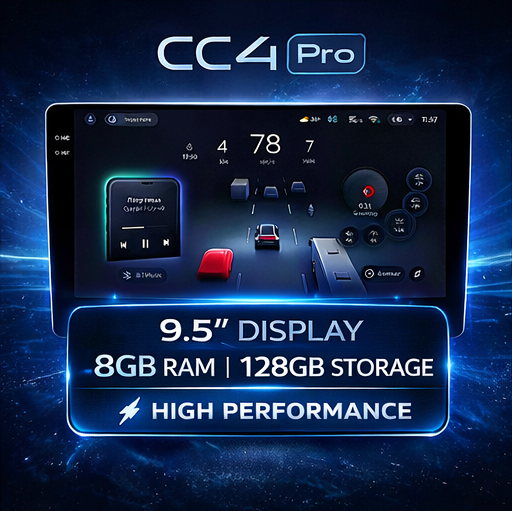
The CC4 Pro uses the Qualcomm QCM6490 platform with LPDDR5 memory and UFS 3.1 storage. TEYES lists 8 GB RAM with 128 GB storage and 12 GB RAM with 256 GB storage. The extra capacity is useful if you plan to store offline maps, download more apps or keep a larger media library on the unit. Check the exact memory option on the vehicle listing. TEYES model comparison
The distinction matters most if you intend to use the head unit as an Android device in its own right. Think of a weekend away where you want offline maps ready to go, or a daily drive where you alternate between navigation and music. If you mainly mirror a phone and rarely install apps, start by comparing the lower-capacity configuration.

2. Android Auto and onboard Android apps
Android Auto brings compatible apps from your Android phone to the dashboard, including navigation and audio. Apple CarPlay is available for compatible iPhones in shared vehicles. The CC4 Pro also runs TEYES OS, based on Android 13, so you can use supported onboard apps and download maps for offline use where the app offers it. App availability, connection method and mobile data requirements depend on your setup. CC4 Pro brochure

3. Digital camera inputs with room to expand
The CC4 Pro supports up to six camera inputs, with four digital and two analogue channels. Compatible setups can record camera feeds to a USB drive. That gives you room to plan a front and rear camera setup now and consider a compatible surround-view package later. Camera type, recording and viewing options depend on the chosen hardware. CC4 Pro camera specifications
For a reverse-only setup, start by checking whether your factory camera can be retained and which adapter it requires. For a ute, van or family SUV that’s difficult to place in tight spaces, consider the compatible digital 360° package. It needs suitable mounting positions and calibration. ADAS features require compatible equipment and setup. Use camera views and alerts alongside mirrors and direct observation. Explore CC4 Pro camera packages

4. Audio tuning you can build around
With active three-way audio support, the CC4 Pro lets you tune frequency ranges for compatible speaker setups from the head unit. Time alignment can help compensate for the different distances between your seat and each speaker. Optical and coaxial outputs give you options when pairing the head unit with compatible external audio equipment. Explore CC4 Pro audio features
If your car has Bose, JBL or another factory premium audio system, tell us before choosing the kit. The factory amplifier and wiring determine which harness or interface you need. If you plan to install aftermarket speakers, an amplifier or a subwoofer, sketch out the signal path with your installer before ordering.
Optical or coaxial S/PDIF?
Choose the digital output that matches your external DSP or amplifier input. Optical uses a TOSLINK cable, while coaxial uses a digital coaxial cable. Check the downstream device’s input and use its matching cable. If you’re keeping a factory amplifier, check the vehicle-specific interface before choosing a connection.

5. Screen options for different dashboards
Choose the screen size around the dash. The standard CC4 Pro range includes 9.2-inch and 10.36-inch options, with separate 11-inch, 13-inch and 12.3-inch offerings for compatible applications. Check the fascia, vents, hazard switch and other controls. For the 12.3-inch model, use its dedicated accessory compatibility guide when choosing cameras or related hardware. 11-inch and 13-inch CC4 Pro · 12.3-inch accessory guide
CC4 Pro vs CC4 vs CC4L
| Model | Best fit | Camera inputs |
|---|---|---|
| CC4 Pro | Drivers who want digital cameras and the strongest processor in the CC4 range | Up to six, including four digital |
| CC4 | Drivers who want advanced audio tuning and an analogue camera setup | Up to six analogue |
| CC4L | Drivers who mainly want everyday smartphone connectivity and a simpler camera setup | Up to two analogue |
If you’re deciding between CC4 and CC4 Pro, work out which camera hardware you plan to use. Both support active three-way audio tuning. The Pro’s faster platform and digital camera inputs are the clearest reasons to step up. See the full side-by-side specifications
How to choose the right kit for your vehicle
- Find the build date and model code. A registration year can overlap two dashboards or a facelift.
- Take a clear photo of the dash. Include the screen, vents and climate controls so the fascia and original equipment can be identified.
- List the factory features you use. Note steering wheel controls, reverse or surround cameras, premium audio, USB ports and any vehicle settings you access through the original screen.
- Choose your screen and camera setup. Check which options fit the dash and what comes with your selected package.
- Plan installation. Allow for extra wiring, camera mounting or calibration if your setup requires it. Confirm the kit details before removing your original stereo.
Ask TEYES to check your dashboard and fitment · Find an installer
Android Auto head unit FAQs
What is the best Android Auto head unit in Australia in 2026?
The TEYES CC4 Pro is our premium pick if you want Android Auto, a vehicle-specific dashboard kit, advanced sound tuning and optional digital cameras. Start with the kit that fits your dash. If your main priority is phone navigation and music, compare CC4 and CC4L before spending more. Compare TEYES models.
How much does an Android Auto head unit cost in Australia?
Compare the total fitted cost in AUD. Add the head unit, fascia, wiring harness, any camera or amplifier retention adapters, optional accessories and installation. Two kits with similar sticker prices can end up costing different amounts once those parts are included. Check the selected vehicle kit for current pricing and ask your installer for a quote that itemises parts and labour. Browse CC4 Pro vehicle kits.
Is an Android Auto head unit worth it if I only want Bluetooth?
A basic Bluetooth stereo can cover calls and streaming. Android Auto is worth considering when you also want navigation, compatible apps and phone controls on the dash. If you already have Android Auto and only want better sound, start by identifying what is limiting your factory audio system.
What is a head unit in a car, and what do single DIN and double DIN mean?
The head unit is the dashboard stereo or infotainment receiver. Single DIN and double DIN describe standard mounting formats, with double DIN approximately twice the chassis height. Screen size alone does not tell you which mount a unit uses. An integrated factory dash may need a vehicle-specific fascia and harness even if the replacement electronics use a standard chassis. Browse universal TEYES head units.
How do I get AM radio on an Android head unit?
Open the unit’s radio app and choose AM if the model has an AM tuner. Check the aerial connection and any required antenna adapter or power feed. For DAB+ in Australia, check support for a compatible receiver and antenna. Internet radio uses data and can be useful where you have mobile coverage.
How do I use Apple CarPlay on an Android head unit?
Connect a compatible iPhone to a head unit that supports CarPlay, using the wired or wireless setup listed for that model. Follow the prompts with the vehicle parked. A household with both Android phones and iPhones can choose a receiver that supports Android Auto and CarPlay.
How do I update a TEYES Android head unit?
Identify the exact model and current software version, then follow the TEYES instructions for that unit. The update method can vary. Use the firmware specified for your hardware and keep power stable throughout the update. Find TEYES firmware and support.
Can I install an Android Auto head unit myself?
A vehicle-specific fascia and harness can simplify the job. Factory amplifiers, integrated climate controls, camera retention and CAN bus interfaces can add complexity. Ask an installer for a quote if you are unsure which factory features your car needs to retain. Find a TEYES installer.
How do I remove a factory car head unit?
Use the removal instructions for your vehicle and dashboard trim. Some stereos use release keys, while integrated units may sit behind clipped trim and hidden screws. If the trim carries hazard, airbag or climate-control wiring, consult the vehicle service instructions or have an installer remove it.
Are Android head units any good?
A well-matched Android head unit can add phone connectivity, onboard apps and audio or camera options to a car you want to keep. The right choice depends on how well it fits and which factory features you can retain. Check the exact dash, trim, build date and original equipment before ordering.
Can I install Android Auto on my existing head unit?
Android Auto runs from your compatible phone and displays supported apps on a compatible car or receiver. An Android operating system or a USB port alone does not establish receiver compatibility. For an existing stereo, check whether the manufacturer supports Android Auto on that exact model. Check Google’s Android Auto requirements.
Is wired or wireless Android Auto better?
Wired Android Auto can charge your phone while connected and is useful for long trips. Wireless Android Auto is convenient on short drives and needs a compatible phone and receiver. Check both devices before buying, and use a quality data cable if you choose wired. See Google’s setup steps.
How much RAM do I need for an Android Auto head unit?
Your phone runs the projected Android Auto apps, so extra head unit RAM is a stronger reason to upgrade if you also use onboard Android apps. On CC4 Pro, choose 8 GB RAM with 128 GB storage or 12 GB with 256 GB where available. More storage helps if you keep offline maps or media on the unit. Compare memory options.
How do I connect an external amplifier to an Android head unit?
Check the head unit outputs and amplifier inputs first. A compatible analogue pre-out, or a digital connection to suitable equipment, can feed your audio system. Check the required wiring and remote turn-on arrangement with your installer. If your vehicle has a factory amplifier, confirm the retention interface before replacing the stereo. See CC4 Pro audio connections.
Will a new head unit improve sound quality?
It can give you better control over the sound through equalisation, crossover settings and time alignment. The result also depends on speakers, amplifier, signal quality and setup. For a sound-focused upgrade, decide whether you will keep the factory speakers and amplifier before choosing the receiver.
What’s the difference between Android Auto and an Android head unit?
Android Auto uses compatible apps on your phone. An Android head unit can also run supported apps directly on the unit. On the CC4 Pro, that gives you the option to use onboard apps and store offline maps where supported.
Can I keep my steering wheel controls and factory camera?
That depends on your vehicle and the supplied harness or interface. Confirm both features on the specific kit listing. Include a dashboard photo when asking for a fitment check.
Is the 360° camera system included?
Check the selected package. The ability to connect a compatible 360° system and the inclusion of the cameras are separate details on the product listing. View CC4 Pro 360° packages
Is 8 GB RAM and 128 GB storage enough?
It’s a sensible starting point for maps, music, phone connectivity and a modest app library. Consider 12 GB and 256 GB if you want more local storage for maps, apps and media. Choose from the configurations offered for your fitment.
What if I can’t find my vehicle?
Send your make, model, build date and a photo of the original dashboard. Mention your factory amplifier or camera if fitted. The same model can use different trim and wiring across markets.
Find your CC4 Pro upgrade
Choose the CC4 Pro if you want to upgrade your dashboard, tune your audio and have the option to add compatible digital cameras. Start with the vehicle kit and confirm the fitment before choosing screen size, storage or accessories.
Browse CC4 Pro vehicle kits → · Read the brochure · Visit TEYES support